tabindex="-1" (or any negative value) makes an element focusable if it isn’t already, and removes it from the tab order. It can still receive focus programmatically or by click, but not via the Tab key.
Notes
Note - Posted on
Today I learned that modal
<dialog>s opened withshowModal()can have their own<h1>.I discovered this while reading Modern Web Guidance’s HTML guide. I was skeptical at first because it’s bad practice to have multiple
<h1>s on a single web page.But this exception for modal dialogs made sense when I learned what
showModal()does. It makes the rest of the pageinertand as mentioned on MDN,inertHTML elements and their flat tree descendantsare hidden from assistive technologies as they are excluded from the accessibility tree
. So while the modal dialog is open there is no other<h1>to compete with.I’m not sure if there is consensus on this because I have seen many examples where an
<h2>was used instead.Note - Posted on
The curse of discipline is that every day looks the same. The curse of indiscipline is that every year does.
Note - Posted on
Just watched Adam Argyle’s CSS Day talk on Contextualism. Excellent as usual.
Adam shared a mega list of things a component could and should respond to. He was so mad that most of our components (including his own) do almost none of it.
Note - Posted on
Today I learned, through Sara Soueidan’s course, Practical Accessibility, that spectacles/eyeglasses are a form of assistive technology.
I’ve worn glasses for most of my life, but I’ve never really thought of myself as someone who uses assistive technology.
It made me realize how easily we can think of assistive technology as something that exists for “people with disabilities,” rather than something many of us may rely on ourselves.
Note - Posted on
I’ve put hours into learning CSS over the years and continue to do so happily. Building things with HTML and CSS is the part of the work I enjoy the most.
But it always felt like there were gaps in my knowledge. So I just enrolled in Poetic CSS to finally understand it from the inside out.
Note - Posted on
Today I learned via Paweł Grzybek’s post on Mastodon, where Temani Afif pointed out that text decorations propagate to their descendants, they aren’t inherited.
The difference between propagation and inheritance is that the descendants don’t get their own
text-decorationproperty. So, the line, color, style and thickness are all determined by the ancestor wheretext-decorationwas declared.A descendant can still declare its own
text-decoration, but that creates an additional decoration on top, it doesn’t modify or remove the ancestor’s.Note - Posted on
Today I learned, adding
tabindex="-1"to skip link targets is likely no longer necessary in modern browsers.Manuel Matuzović tested skip links without
tabindex="-1"on targets across major browsers and screen readers on macOS, Windows and Android, concluding it is safe to remove in most setups, thanks to sequential focus navigation starting point.Furthermore, adding
tabindex="-1"to skip link targets also introduces a regression in usability. Withtabindex="-1"onmain, clicking on any non-interactive area insidemainmakesmainitself the focus starting point. So, the next tab press sends focus to the first focusable element inmain, not the next one after where the user clicked. The gov.uk team removedtabindexfrommainfor this reason.Note - Posted on
Today, while working through an exercise in Eloquent JavaScript, I learned about the concept of parity in maths.
The parity of an integer is its attribute of being even or odd. Thus, it can be said that 6 and 14 have the same parity (since both are even), whereas 7 and 12 have opposite parity (since 7 is odd and 12 is even).
– Weisstein, Eric W, Parity
Initially, I had assumed “same parity” meant “same value”, which is roughly what it means in English. However, in maths it’s narrower. It just means both numbers are even or both are odd.
Note - Posted on
I just read Dave Rupert’s post on Inverted themes with
light-dark(). It’s great.I wish
light-dark()accepted any value and not just colors. I have a use case where I use lighter font weights in dark mode.Bramus wrote about a custom
--light-dark()function using@function,if()andcolor-scheme()that would solve this in the future.Note - Posted on
Just watched the latest Whiskey Web and Whatnot episode with Chris Coyier and Dave Rupert. No one would’ve guessed that I was watching a web dev podcast from how much I was laughing.
At one point in the episode Adam mentions, “holy crap, my job is now leftover tokens in a burn window”. If Adam can feel like AI is making his work redundant then what hope do I have? 🙈
Note - Posted on
Last week, I built a visual explainer of the CSS Cascade.
I used anchor positioning with chained anchors to stack the cascade steps. It worked, but Safari 26.4 and earlier had a bug with chained anchors, so I had to exclude Safari entirely via an
@supportshack.I wasn’t entirely happy with that, so I refactored the layout to use a subgrid based approach with
grid-template-areas. Since subgrid became Baseline Widely Available recently, the timing also worked out.While I was at it, I also restructured the HTML such that each cascade step is now a list item inside an ordered list, which gives better semantics.
Note - Posted on
I built a visual explainer of the CSS Cascade, the algorithm that determines the “winning value” from a list of competing declarations.
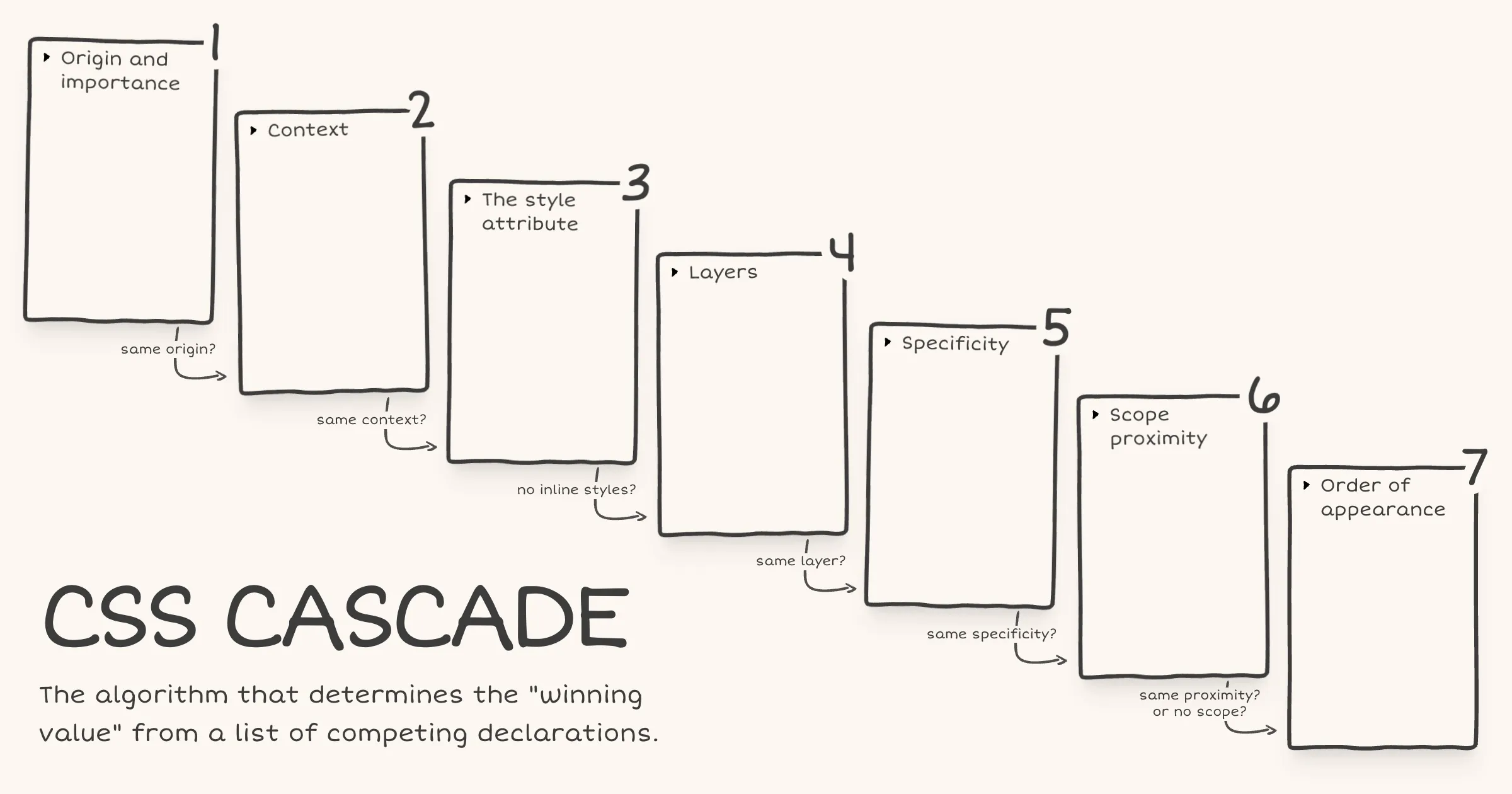
After Web Day Out 2026, I was checking out Manuel Matuzović’s UA+ stylesheet. Manuel mentioned that he wraps all rules in an anonymous layer to avoid specificity issues. I realised I didn’t actually understand how anonymous layers worked, so I went back and re-read Miriam Suzanne’s cascade layers guide on CSS-Tricks. I really liked the way Miriam presented the cascade and specifically the order of precedence within each step.
Recently, while learning
@scope, I had come across a diagram of the cascade in Bramus’ article on@scope. I had seen it before in his CSS Day 2022 talk as well but this time it stuck with me. The layout just made the cascade click visually.I wondered if I could combine Bramus’ cascade diagram layout with the order of precedence information from Miriam’s article. The early CodePen prototype turned out well enough that I decided to polish and publish it.
There are still some things to be done. The website currently fails WCAG Success Criterion 1.4.4: Resize Text (Level AA) under certain conditions. I haven’t landed on a fix that works for the design yet. Hit me up if you have any ideas.
Note - Posted on
I couldn’t make it to Web Day Out 2026. Thankfully, Jeremy wrote about it and linked to a bunch of online talk about it. Special shout out to Josh Tumath who live-blogged each talk.
By all accounts, it was an excellent event. The regret at missing out (RAMO) is real. I remotely attended State of the Browser 2026 and I’d love it if more events offered a remote option.
Many of the speakers were kind enough to share a link to their slides. I haven’t checked out all of them yet, but I liked Manuel Matuzović’s talk ‘Breaking with habits’. So much so that I feel the urge to redesign my portfolio based on the approach he showed. For now, I’ll dive deep into his UA+ stylesheet and oli.css project to get a deeper understanding.
Note - Posted on
What happens when the
var()CSS function references a custom property that is undefined or explicitly set toinitial?In both cases the custom property’s value is the guaranteed-invalid value. That’s the initial value of every custom property as defined in the spec. When
var()encounters this value during substitution, here’s what happens:- If a fallback was provided, the fallback value is used.
- If no fallback was provided, the referencing property becomes invalid at computed-value time (IACVT). The property then behaves as if its value had been specified as the
unsetkeyword.
Note - Posted on
I just read the latest issue of Chris’ Corner on CodePen. I then read the following articles, all of which Chris links to:
- Chris’ article on The Big Gotcha of Anchor Positioning
- Temani Afif’s article on Why is Anchor Positioning not working?
- James Stuckey Weber’s article on CSS Anchor Positioning in Practice
Oh boy! My mind is completely fried. I had no idea anchor positioning was this complicated. I would be afraid to touch CSS anchor positioning if not for this recommendation from James to make it work reliably.
- Make the anchor and the positioned element siblings.
- Put the anchor first in the DOM.
I also saw the Winging It episode on ‘Debugging CSS Anchor Positioning‘. It really helped me develop a mental model of how anchor positioning works and why the gotchas exist.
Also, I totally agree with Tab Atkins-Bittner that dev tools really need a way to show the containing block for elements, especially absPos/fixedPos elements.
Note - Posted on
I liked Kevin Powell’s video on the slide-in nav. In the video, Kevin demonstrates how to create a sticky header that initially scrolls away (when the user scrolls the page), then slides back into view as a sticky top bar once the user has scrolled past a certain threshold.
He achieves the slide-in effect using scroll state queries and a negative
inset-block-starton the sticky positioned element.He also recreates the effect using scroll driven animations. But it’s not an ideal solution, since as he puts it speaking about the header, “if I stop at the wrong spot, it’s like halfway there”. That is definitely a usability issue.
I remembered Bramus sharing his post on scroll triggered animations. As Bramus mentions, scroll triggered animations “trigger when crossing a specific scroll offset”. This is exactly what’s required to avoid the problem Kevin mentioned above.
Here’s my CodePen demo achieving the slide-in effect using scroll triggered animations.
I tested it on Chrome Canary v147. No other browser seems to support it yet, not even Chrome v145 even though Bramus’ article says it ships with v145. On browsers that don’t support scroll triggered animations, there is no slide-in effect but the header remains sticky.
Note - Posted on
I keep forgetting how each of the following CSS values rolls back a declaration to a different point in the cascade. It was about time I jotted it down for my future self before it slips my mind again for the 1000th time.
initial- Applies the initial value as defined in the CSS spec
unset- Inherits or falls back to the initial value
revert- Reverts to the user agent's default value
revert-layer- Rolls back to the value in a previous cascade layer
Note - Posted on
I’ll be attending State of the Browser for the first time, remotely! 💃🏻
Really looking forward to Bramus’ talk on CSS Anchor Positioning and Zach’s talk on reducing the JS footprint.
Note - Posted on
Today I learned that setting
type="reset"on a<button>element in HTML creates a reset button that, when activated, immediately clears all form data, resetting it to its initial state.This could have been useful in the context of a search form. But
<input type="search">already provides a native clear button for that single field.