Turns out, if you have a website and you think of the browser as a way to navigate documents — rather than a runtime to execute arbitrary code and fetch, compile, and present them — things can be a lot simpler than our tools often prime us to make them.
Nobody Gets Promoted for Simplicity – Terrible Software
You can’t write a compelling narrative about the thing you didn’t build. Nobody gets promoted for the complexity they avoided.
Complexity looks smart. Not because it is, but because our systems are set up to reward it.
Note - Posted on
Today, while working through an exercise in Eloquent JavaScript, I learned about the concept of parity in maths.
The parity of an integer is its attribute of being even or odd. Thus, it can be said that 6 and 14 have the same parity (since both are even), whereas 7 and 12 have opposite parity (since 7 is odd and 12 is even).
– Weisstein, Eric W, Parity
Initially, I had assumed “same parity” meant “same value”, which is roughly what it means in English. However, in maths it’s narrower. It just means both numbers are even or both are odd.
James Shore: You Need AI That Reduces Maintenance Costs
Your AI coding agent, the one you use to write code, needs to reduce your maintenance costs. Not by a little bit, either. You write code twice as quick now? Better hope you’ve halved your maintenance costs. Three times as productive? One third the maintenance costs. Otherwise, you’re screwed. You’re trading a temporary speed boost for permanent indenture.
[…] The math only works if the LLM decreases your maintenance costs, and by exactly the inverse of the rate it adds code. If you double your output and your cost of maintaining that output, two times two means you’ve quadrupled your maintenance costs. If you double your output and hold your maintenance costs steady, two times one means you’ve still doubled your maintenance costs.
Getting Developers to Care about Accessibility: Carrots and Sticks - Sheri Byrne-Haber's Blog
A developer who builds accessible interfaces is more skilled. Say this out loud. Repeat it often. A developer who creates accessible interfaces isn’t doing extra work; they’re doing the work the right way.
Do I belong in tech anymore? · Ky Decker
No matter how rapidly technology changes, I am coalescing around some core beliefs:
- Things that are worth doing are worth doing well.
- Things that are done well require time and effort.
- You make meaning through the doing.
- Ideas are common; effort is not.
- There are no shortcuts.
Note - Posted on
I just read Dave Rupert’s post on Inverted themes with
light-dark(). It’s great.I wish
light-dark()accepted any value and not just colors. I have a use case where I use lighter font weights in dark mode.Bramus wrote about a custom
--light-dark()function using@function,if()andcolor-scheme()that would solve this in the future.Note - Posted on
Just watched the latest Whiskey Web and Whatnot episode with Chris Coyier and Dave Rupert. No one would’ve guessed that I was watching a web dev podcast from how much I was laughing.
At one point in the episode Adam mentions, “holy crap, my job is now leftover tokens in a burn window”. If Adam can feel like AI is making his work redundant then what hope do I have? 🙈
What Is CSS Containment and How Can I Use It? – CSS Wizardry
Harry Roberts on what CSS containment actually is, what each
containvalue does, and how to use it confidently on real projects without creating hard-to-debug side effects.Note - Posted on
Last week, I built a visual explainer of the CSS Cascade.
I used anchor positioning with chained anchors to stack the cascade steps. It worked, but Safari 26.4 and earlier had a bug with chained anchors, so I had to exclude Safari entirely via an
@supportshack.I wasn’t entirely happy with that, so I refactored the layout to use a subgrid based approach with
grid-template-areas. Since subgrid became Baseline Widely Available recently, the timing also worked out.While I was at it, I also restructured the HTML such that each cascade step is now a list item inside an ordered list, which gives better semantics.
Note - Posted on
I built a visual explainer of the CSS Cascade, the algorithm that determines the “winning value” from a list of competing declarations.
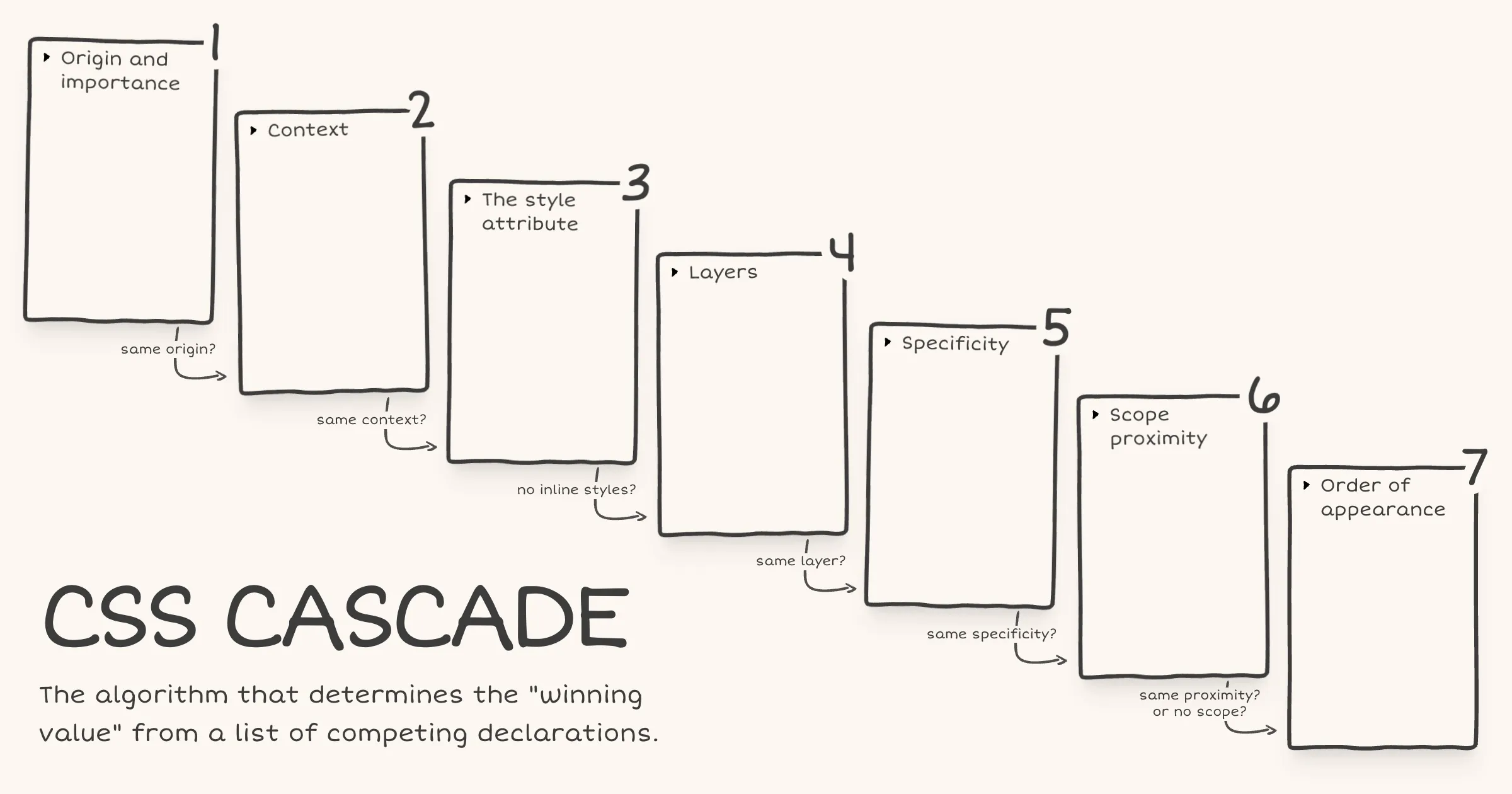
After Web Day Out 2026, I was checking out Manuel Matuzović’s UA+ stylesheet. Manuel mentioned that he wraps all rules in an anonymous layer to avoid specificity issues. I realised I didn’t actually understand how anonymous layers worked, so I went back and re-read Miriam Suzanne’s cascade layers guide on CSS-Tricks. I really liked the way Miriam presented the cascade and specifically the order of precedence within each step.
Recently, while learning
@scope, I had come across a diagram of the cascade in Bramus’ article on@scope. I had seen it before in his CSS Day 2022 talk as well but this time it stuck with me. The layout just made the cascade click visually.I wondered if I could combine Bramus’ cascade diagram layout with the order of precedence information from Miriam’s article. The early CodePen prototype turned out well enough that I decided to polish and publish it.
There are still some things to be done. The website currently fails WCAG Success Criterion 1.4.4: Resize Text (Level AA) under certain conditions. I haven’t landed on a fix that works for the design yet. Hit me up if you have any ideas.
Writing code is cheap now - Agentic Engineering Patterns - Simon Willison's Weblog
Simon Willison on what they mean by “good code”:
- The code works. It does what it’s meant to do, without bugs.
- We know the code works. We’ve taken steps to confirm to ourselves and to others that the code is fit for purpose.
- It solves the right problem.
- It handles error cases gracefully and predictably: it doesn’t just consider the happy path. Errors should provide enough information to help future maintainers understand what went wrong.
- It’s simple and minimal - it does only what’s needed, in a way that both humans and machines can understand now and maintain in the future.
- It’s protected by tests. The tests show that it works now and act as a regression suite to avoid it quietly breaking in the future.
- It’s documented at an appropriate level, and that documentation reflects the current state of the system - if the code changes an existing behavior the existing documentation needs to be updated to match.
- The design affords future changes. It’s important to maintain YAGNI - code with added complexity to anticipate future changes that may never come is often bad code - but it’s also important not to write code that makes future changes much harder than they should be.
- All of the other relevant “ilities” - accessibility, testability, reliability, security, maintainability, observability, scalability, usability - the non-functional quality measures that are appropriate for the particular class of software being developed.
Adactio: Journal—Magic
Libraries are bits of other people’s code that I call from my code. Frameworks are other people’s code that call bits of my code.
What is agentic engineering? - Agentic Engineering Patterns - Simon Willison's Weblog
Writing code has never been the sole activity of a software engineer. The craft has always been figuring out what code to write. Any given software problem has dozens of potential solutions, each with their own tradeoffs. Our job is to navigate those options and find the ones that are the best fit for our unique set of circumstances and requirements.
You Might Debate It — If You Could See It - Jim Nielsen’s Blog
When you offload your thinking, you might be on-loading someone else’s you’d never agree to — personally or collectively.
Note - Posted on
I couldn’t make it to Web Day Out 2026. Thankfully, Jeremy wrote about it and linked to a bunch of online talk about it. Special shout out to Josh Tumath who live-blogged each talk.
By all accounts, it was an excellent event. The regret at missing out (RAMO) is real. I remotely attended State of the Browser 2026 and I’d love it if more events offered a remote option.
Many of the speakers were kind enough to share a link to their slides. I haven’t checked out all of them yet, but I liked Manuel Matuzović’s talk ‘Breaking with habits’. So much so that I feel the urge to redesign my portfolio based on the approach he showed. For now, I’ll dive deep into his UA+ stylesheet and oli.css project to get a deeper understanding.
Inherited properties leak through the donut scope
Today I learned about a potential pitfall with
@scope.Via MDN [emphasis mine]:
It is important to understand that, while
@scopeallows you to isolate the application of selectors to specific DOM subtrees, it does not completely isolate the applied styles to within those subtrees. This is most noticeable with inheritance — properties that are inherited by children (for examplecolororfont-family) will still be inherited, beyond any set scope limit.In other words,
@scopeisolates your selectors, not your styles. Here’s what that looks like in practice.<article class="card"> <p>In scope</p> <div class="content"> <p>Outside the scope limit</p> </div> </article>@scope (.card) to (.content) { :scope { color: red; font-family: Georgia, serif; } p { padding: 1lh; outline: 1px solid; } }The second
<p>, the one inside.content, won’t get thepaddingoroutlinebecause those are non-inherited properties in the scope limit. That part works exactly as you’d expect.But it will still turn red and render in Georgia because
colorandfont-familyare inherited properties set on.card(via:scope). And as we just learned from MDN, inheritance flows through the DOM regardless of where@scopesets the scope limit.As Miriam mentioned in the Winging It episode on CSS Scope & Mixins, it has to work this way because if
@scopeblocked inheritance at the scope limit, every element beyond the scope limit would receive the initial value for each inherited property.initialapplies the value as defined in the CSS spec. And that would be far more destructive than letting inheritance flow through.If you’re coming from JavaScript, you might expect custom properties to work like scoped variables work in JavaScript. But in CSS, custom properties are inherited properties just like
colororfont-family.@scope (.card) to (.content) { :scope { --text-color: red; font-family: Georgia, serif; } p { color: var(--text-color); padding: 1lh; outline: 1px solid; } } /* This rule exists to show that the inherited value is available beyond the scope limit */ .content p { color: var(--text-color); }With the same HTML, the second
<p>again loses thepaddingandoutline. But--text-colorinherits down from.cardinto.content p. So the second<p>also turns red because itscolorproperty referencesvar(--text-color)which resolves tored.For custom properties, if inheritance were blocked at the scope limit and no ancestor outside the scope had also defined it, any
var(--text-color)beyond the scope limit would be undefined and that would just trigger the fallback in thevar()function, or if there’s no fallback, the property using it would behave asunset.There’s more to what happens when a custom property is undefined, involving the guaranteed-invalid value and invalid at computed-value time (IACVT). I wrote a note on what happens when the CSS function
var()references an undefined custom property.Note - Posted on
What happens when the
var()CSS function references a custom property that is undefined or explicitly set toinitial?In both cases the custom property’s value is the guaranteed-invalid value. That’s the initial value of every custom property as defined in the spec. When
var()encounters this value during substitution, here’s what happens:- If a fallback was provided, the fallback value is used.
- If no fallback was provided, the referencing property becomes invalid at computed-value time (IACVT). The property then behaves as if its value had been specified as the
unsetkeyword.
Note - Posted on
I just read the latest issue of Chris’ Corner on CodePen. I then read the following articles, all of which Chris links to:
- Chris’ article on The Big Gotcha of Anchor Positioning
- Temani Afif’s article on Why is Anchor Positioning not working?
- James Stuckey Weber’s article on CSS Anchor Positioning in Practice
Oh boy! My mind is completely fried. I had no idea anchor positioning was this complicated. I would be afraid to touch CSS anchor positioning if not for this recommendation from James to make it work reliably.
- Make the anchor and the positioned element siblings.
- Put the anchor first in the DOM.
I also saw the Winging It episode on ‘Debugging CSS Anchor Positioning‘. It really helped me develop a mental model of how anchor positioning works and why the gotchas exist.
Also, I totally agree with Tab Atkins-Bittner that dev tools really need a way to show the containing block for elements, especially absPos/fixedPos elements.
Note - Posted on
I liked Kevin Powell’s video on the slide-in nav. In the video, Kevin demonstrates how to create a sticky header that initially scrolls away (when the user scrolls the page), then slides back into view as a sticky top bar once the user has scrolled past a certain threshold.
He achieves the slide-in effect using scroll state queries and a negative
inset-block-starton the sticky positioned element.He also recreates the effect using scroll driven animations. But it’s not an ideal solution, since as he puts it speaking about the header, “if I stop at the wrong spot, it’s like halfway there”. That is definitely a usability issue.
I remembered Bramus sharing his post on scroll triggered animations. As Bramus mentions, scroll triggered animations “trigger when crossing a specific scroll offset”. This is exactly what’s required to avoid the problem Kevin mentioned above.
Here’s my CodePen demo achieving the slide-in effect using scroll triggered animations.
I tested it on Chrome Canary v147. No other browser seems to support it yet, not even Chrome v145 even though Bramus’ article says it ships with v145. On browsers that don’t support scroll triggered animations, there is no slide-in effect but the header remains sticky.